Tile Calculator
Calculate how many tiles you need, estimate waste, boxes and total project cost.
Room Dimensions
Tile Dimensions
Tile & Project Settings
Tile Calculation Results
Cost Estimator
Tile Layout Preview
Tile Calculator: Calculate How Many Tiles You Need
Planning a flooring or wall tiling project starts with one important question: How many tiles do I need? Buying too few tiles can delay your project, while buying too many can increase your budget and leave you with unnecessary material.
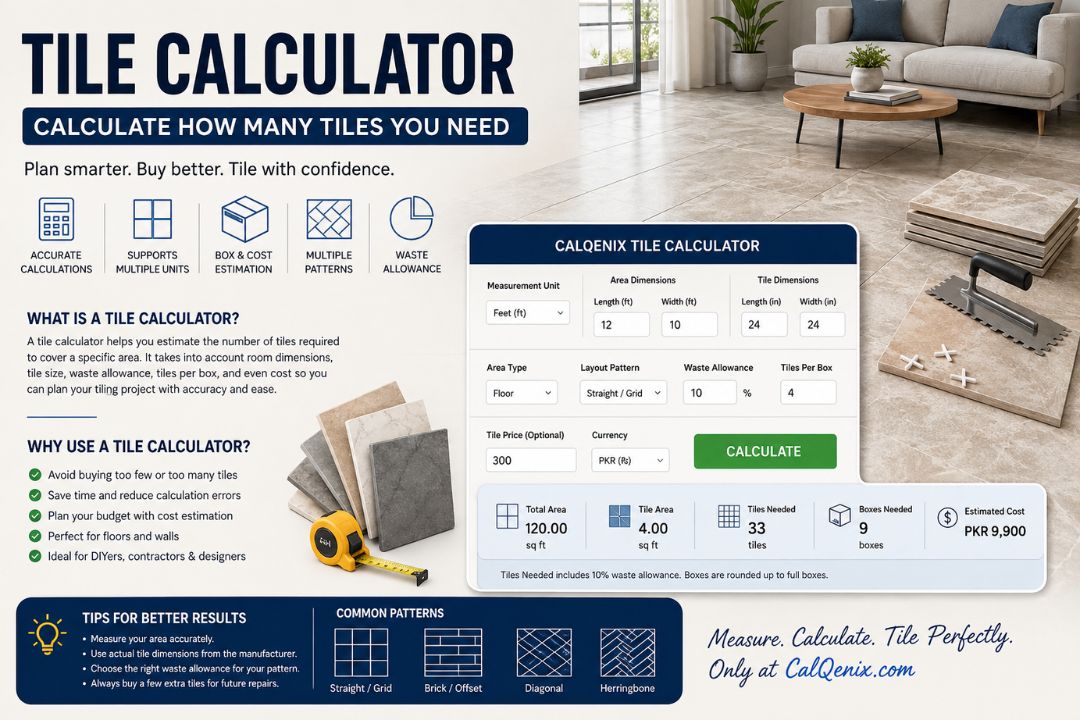
The CalQenix Tile Calculator makes this calculation easier. You can enter your room dimensions, tile dimensions, waste percentage, tiles per box, tile price, and layout pattern to estimate the quantity of tiles required for your project.
The calculator is designed to make tile planning faster and easier for homeowners, contractors, builders, interior designers, and anyone working on a flooring or wall project.
What Is a Tile Calculator?
A tile calculator is an online tool that estimates the number of tiles required to cover a specific area. The basic calculation uses the total surface area and the area covered by one tile.
For a rectangular room, you first calculate the room area by multiplying length by width. You then calculate the area of one tile and divide the room area by the tile area.
A waste allowance is normally added because real tile installations require cuts around walls, corners, doors, fixtures, drains, cabinets, and other obstacles. Tiles can also break during transportation or installation.
The CalQenix Tile Calculator takes these factors into account and provides a practical estimate instead of requiring you to perform every calculation manually.
How Does the CalQenix Tile Calculator Work?
Using the calculator is simple. You provide information about the area you want to tile and the tiles you plan to use.
Start by entering the room length and width. You can choose between different measurement units, including feet, inches, meters, and centimeters.
Next, enter the length and width of your tile. Tile measurements can be entered in inches, centimeters, millimeters, feet, or meters.
The calculator then determines the room area and tile area using the appropriate unit conversions. It calculates the basic number of tiles and adds the selected waste allowance.
You can also enter the number of tiles included in each box. The calculator then estimates how many complete boxes you should purchase.
For budgeting, you can enter the price per tile and select a currency. The calculator can display an estimated material cost in currencies such as USD, PKR, GBP, EUR, AED, and SAR.
How to Calculate Tiles Manually
Understanding the basic formula is useful even when you have an online tile calculator.
For a rectangular room, the first step is to calculate the floor area.
Room Area = Length × Width
For example, if your room is 12 feet long and 10 feet wide:
12 × 10 = 120 square feet
The room therefore has a total area of 120 square feet.
The next step is to calculate the area covered by one tile.
Suppose your tile measures 24 × 24 inches. Since 12 inches make one foot, a 24-inch tile is 2 feet long and 2 feet wide.
Therefore:
2 × 2 = 4 square feet
Each tile covers approximately 4 square feet.
Without waste, you would need:
120 ÷ 4 = 30 tiles
If you allow 10% for waste:
30 × 1.10 = 33 tiles
You would therefore plan to purchase approximately 33 tiles.
This is the basic calculation performed by many tile calculators.
Why Should You Add Tile Waste?
Waste is an important part of any tile estimate.
Tiles rarely fit perfectly from one wall to another. The installer usually needs to cut tiles around the perimeter of the room and around objects such as doors, columns, drains, toilets, cabinets, pipes, and other fixtures.
Some pieces created by cutting can be reused elsewhere, but others may be too small or unsuitable.
Tiles can also break while being transported, cut, handled, or installed.
For this reason, ordering exactly the calculated number of tiles is usually not a good idea.
A straight installation in a relatively simple rectangular room may require around 5–10% extra material, while more complicated layouts can require a higher allowance. Diagonal and intricate patterns generally create more cuts and therefore more waste.
The CalQenix calculator allows you to change the waste percentage instead of forcing you to use one fixed number.
What Waste Percentage Should You Use?
There is no single waste percentage that works for every project.
For a simple rectangular room with a straight tile layout, 10% is a practical starting point.
If the room has many corners, unusual dimensions, or several areas that require cuts, you may want to increase the allowance.
Diagonal installations generally require more cutting than a simple straight layout. Herringbone and other complex patterns can also require additional material.
Some current tile-calculation guides suggest approximately 10% for straightforward layouts and around 12–20% for more complex layouts, although the actual requirement depends on the project.
The important point is that waste is an estimate. A professional installer may recommend a different allowance after looking at the actual room.
Tile Layout Patterns Matter
The way tiles are installed can affect the amount of material required.
The CalQenix Tile Calculator includes several layout options, including straight/grid, brick/offset, diagonal, and herringbone.
A straight layout generally produces a simple pattern with relatively predictable cuts.
A brick or offset layout shifts each row relative to the previous row. Depending on the offset and room dimensions, this can create additional cuts.
A diagonal layout places tiles at an angle, which usually increases the number of perimeter cuts.
Herringbone is more complicated because tiles are arranged at alternating angles. This can produce considerably more offcuts than a basic straight layout.
The calculator uses pattern adjustments as an estimation aid. For unusual rooms or highly detailed designs, the final quantity should still be confirmed by the installer.
Tile Calculator for Bathroom Floors
A bathroom floor is a common application for a tile calculator.
Bathrooms can be difficult to estimate because they often have small dimensions, corners, drains, toilets, cabinets, and other fixtures.
For example, imagine a bathroom measuring 8 feet by 6 feet.
The floor area is:
8 × 6 = 48 square feet
If you choose 12 × 24-inch tiles, each tile covers approximately 2 square feet.
Without waste:
48 ÷ 2 = 24 tiles
With 10% waste:
24 × 1.10 = 26.4
Since you cannot purchase 0.4 of a tile, you would round up.
The final purchase quantity would therefore be at least 27 tiles, before considering packaging requirements.
For a bathroom with many cuts or a complex pattern, a higher waste allowance may be more appropriate.
Tile Calculator for Kitchen Floors
The same approach can be used for kitchens.
Measure the length and width of the area that will actually receive tile. If the kitchen has multiple rectangular sections, calculate each section separately and add the areas together.
For example, if one section is 10 × 8 feet and another is 6 × 4 feet:
First section:
10 × 8 = 80 square feet
Second section:
6 × 4 = 24 square feet
Total:
80 + 24 = 104 square feet
You can then calculate the number of tiles based on the selected tile size.
This method is particularly useful when the kitchen has an irregular shape.
Tile Calculator for Walls
A tile calculator can also be used for walls.
Instead of measuring floor length and floor width, measure the wall width and wall height.
For example, a wall that is 12 feet wide and 8 feet high has an area of:
12 × 8 = 96 square feet
If several walls will be tiled, calculate each wall separately and add the areas together.
Large openings such as doors and windows can sometimes be deducted from the total area. However, small openings and complicated cuts can still contribute to waste, so the final allowance should be considered carefully.
Tile Size Makes a Big Difference
Tile size directly affects the number of individual tiles required.
A 12 × 12-inch tile covers 1 square foot.
A 12 × 24-inch tile covers 2 square feet.
A 24 × 24-inch tile covers 4 square feet.
Therefore, a larger tile generally means fewer individual pieces are required for the same surface area.
However, fewer tiles does not automatically mean less waste.
Large-format tiles can require significant cuts around small rooms, corners, columns, drains, and other obstacles. The best tile size depends on the room, design, installation requirements, and appearance you want.
Why Unit Conversion Is Important
One of the most common mistakes in tile calculations is mixing measurement units.
For example, you might measure the room in feet while the tile packaging gives dimensions in inches.
A 12 × 24-inch tile should not be treated as 12 × 24 feet.
The tile dimensions need to be converted before calculating its area.
The CalQenix Tile Calculator handles the conversion automatically. This allows you to enter room dimensions and tile dimensions using convenient units rather than manually converting every measurement.
The calculator supports feet, inches, meters, centimeters, and millimeters for the relevant inputs.
This is especially useful when tile specifications and construction measurements use different systems.
How Many Tiles Are in a Box?
Tiles are often sold in boxes rather than individually.
The number of tiles in a box depends on the tile manufacturer and tile size.
For example, suppose your calculation says you need 33 tiles and the selected product contains 4 tiles per box.
You calculate:
33 ÷ 4 = 8.25 boxes
Since you cannot purchase 0.25 of a box, you need to round up to 9 boxes.
Nine boxes would contain 36 tiles.
The CalQenix Tile Calculator includes a tiles-per-box field so you can estimate the number of complete boxes required.
Always check the actual packaging because tile coverage per box can vary between products.
Tile Cost Calculator
Quantity is only one part of project planning. You also need to consider the cost of the tiles.
The CalQenix calculator includes an optional price field.
If your calculated requirement is 40 tiles and each tile costs PKR 300:
40 × 300 = PKR 12,000
The calculator can estimate the tile material cost based on the total tile quantity.
You can also select different currencies depending on the market or project you are working with.
Remember that the tile price is only one component of a complete tiling budget.
You may also need to budget for adhesive or mortar, grout, spacers, trims, waterproofing products, transportation, labor, demolition, surface preparation, and other installation materials.
Keep Extra Tiles for Future Repairs
Buying a few additional tiles can be useful even after the installation is complete.
A damaged tile may need to be replaced years later. If the exact tile has been discontinued, finding a perfect match can be difficult.
Tile batches can also vary slightly in shade or appearance.
Keeping several spare tiles from the original purchase can make future repairs much easier.
For this reason, the extra material calculated as waste should not necessarily be viewed as wasted money. Some of it can become useful replacement stock.
How Accurate Is a Tile Calculator?
A tile calculator provides an estimate based on the information you enter.
It can perform the mathematical part of the calculation accurately, but it cannot completely predict every installation condition.
A rectangular room with standard dimensions is relatively straightforward.
An irregular room with multiple corners, doorways, columns, niches, pipes, drains, or complicated patterns is more difficult.
The CalQenix Tile Calculator should therefore be used as a planning tool rather than a replacement for professional measurement when precision is critical.
For expensive materials or complicated installations, have the final quantity checked by your tile installer or contractor.
Common Tile Calculation Mistakes
One common mistake is forgetting waste.
Another is entering inches as feet or centimeters as meters.
A third mistake is forgetting that tiles are often sold by the box.
It is also easy to calculate only the main floor area and overlook additional sections.
For example, a bathroom may have both a main floor and a separate shower area.
Another mistake is assuming that the calculated quantity is the exact amount that should be purchased. Cutting and breakage mean that a small extra allowance is normally sensible.
Finally, remember to verify the tile dimensions and packaging information from the actual product you intend to buy.
Tips for Getting Better Results
Measure the room more than once before entering your dimensions.
If the room is irregular, divide it into smaller rectangular sections and calculate each section separately.
Use the actual tile dimensions shown by the manufacturer rather than relying on a general description such as “large format.”
Choose a reasonable waste allowance based on the installation pattern.
Check the number of tiles contained in each box before purchasing.
If possible, buy spare tiles from the same product batch.
For complex installations, ask the installer to review the quantity before placing a large order.
Frequently Asked Questions
How do I calculate how many tiles I need?
Calculate the surface area, calculate the area of one tile, divide the surface area by the tile area, and then add an appropriate waste allowance.
How much extra tile should I buy?
A common starting point is around 5–10% for straightforward installations. More complicated patterns and rooms with many cuts may require more.
Can I use the calculator for walls?
Yes. Enter the wall width as the length and wall height as the width. For multiple walls, calculate each section separately and combine the results.
Can I calculate tiles in meters?
Yes. The CalQenix Tile Calculator supports metric measurements, including meters and centimeters.
Can I calculate tiles in inches?
Yes. You can enter tile dimensions in inches, which is useful because many tile products are specified using inch measurements.
Does the calculator include waste?
Yes. You can enter a waste allowance and adjust it according to your project.
Does it calculate boxes?
Yes. Enter the number of tiles contained in one box, and the calculator estimates the number of boxes required.
Does it calculate tile cost?
Yes. Enter the price per tile and select a currency to estimate the tile material cost.
What if my room is not rectangular?
For an irregular room, divide it into smaller rectangular areas, calculate each section, and add the results. For highly complicated layouts, professional measurement is recommended.
Start Your Tile Calculation
Accurate planning can make a tiling project easier to manage and can reduce the risk of running out of material halfway through installation.
The CalQenix Tile Calculator brings room measurements, tile dimensions, waste allowance, box quantities, pattern considerations, and optional cost estimation into one simple tool.
Whether you are calculating tiles for a bedroom, living room, kitchen, bathroom, hallway, office, shop, or wall, start by measuring the area carefully and entering the correct tile dimensions.
Once you have the measurements, let the calculator handle the mathematics.
For a simple project, it can give you a quick estimate in seconds. For a more complicated project, it can provide a useful starting point before you confirm the final order with your installer or tile supplier.
